Install Prestashop on Windows 10
NIM :1304505113
Faculty/Major : Engineering/IT Engineering
College : Udayana University
Faculty/Major : Engineering/IT Engineering
College : Udayana University
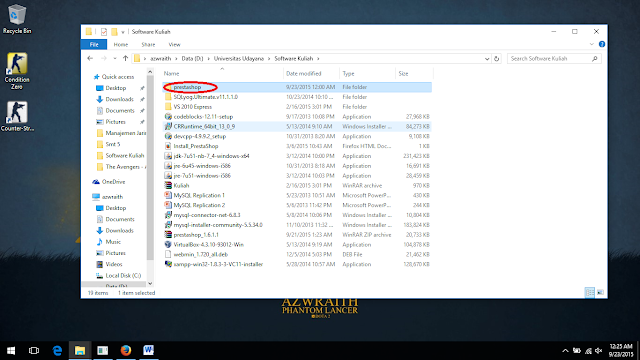
- Download and unzip the PrestaShop package if you haven't already.
- Create a database for PrestaShop shop on your web server if it is possible. In case there is no MySQL user who has all privileges for accessing and modifying this database, create it as well.
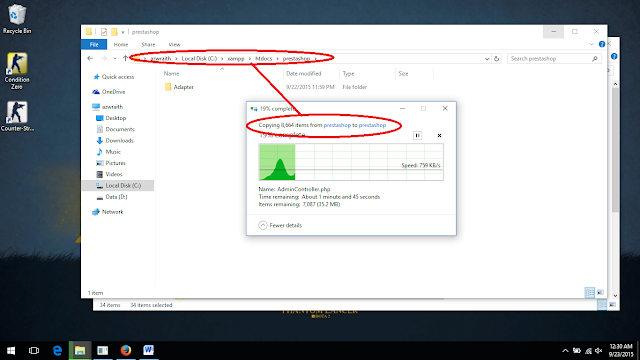
- Upload the PrestaShop files and folders to the chosen location on your web server. Do not upload the root
/prestashopfolder directly: only the files and folders that it contains. - Run the PrestaShop installation script by accessing the public URL for the chosen location in a web browser. This should be the URL where you uploaded the PrestaShop files.
- Follow the instructions on each screen of the installer.
- Once the installation is done, delete the
/installfolder and write down the new of the/adminfolder, which has been generated in order to be unique to you, for security reasons.


Enterprise Resource Planning and Relations to the Others
NIM :1304505113
Faculty/Major : Engineering/IT Engineering
College : Udayana University
Lecturer : I Putu Agus Eka Pratama, S.T.,M.T.
Faculty/Major : Engineering/IT Engineering
College : Udayana University
Lecturer : I Putu Agus Eka Pratama, S.T.,M.T.
Enterprise Resource Planning (ERP) is is business management software—typically a suite of integrated applications—that a company can use to collect, store, manage and interpret data from many business activities, including:
Product planning, cost
Manufacturing or service delivery
Marketing and sales
Inventory management
Shipping and payment
ERP provides an integrated view of core business processes, often in real-time, using common databases maintained by a database management system. ERP systems track business resources,cash, raw materials, production capacity—and the status of business commitments: orders, purchase orders, and payroll. The applications that make up the system share data across the various departments (manufacturing, purchasing, sales, accounting, etc.) that provide the data.
E-commerce (also written as e-Commerce, eCommerce or similar variants), short for electronic commerce, is trading in products or services using computer networks, such as the Internet. Electronic commerce draws on technologies such as mobile commerce, electronic funds transfer, supply chain management, Internet marketing, online transaction processing, electronic data interchange (EDI), inventory management systems, and automated data collection systems. Modern electronic commerce typically uses the World Wide Web for at least one part of the transaction's life cycle, although it may also use other technologies such as e-mail.
E-commerce businesses may employ some or all of the following:
- Online shopping web sites for retail sales direct to consumers
- Providing or participating in online marketplaces, which process third-party business-to-consumer or consumer-to-consumer sales
- Business-to-business buying and selling
- Gathering and using demographic data through web contacts and social media
- Business-to-business electronic data interchange
- Marketing to prospective and established customers by e-mail or fax (for example, with newsletters)
- Engaging in pretail for launching new products and services
Over The Top is a technology on used to approaching and modeling for video and audio streaming,messaging,and social networking, using internet provider connection based on mobile. OTT running on application layer,the highest layer on TCP/OP model or OSI. (I Putu Agus Eka Pratama, S.T.,M.T.)
In broadcasting, over-the-top content (OTT) refers to delivery of audio, video, and other media over the Internet without the involvement of a multiple-system operator in the control or distribution of the content. The Internet provider may be aware of the contents of the Internet Protocol packets but is not responsible for, nor able to control, the viewing abilities, copyrights, and/or other redistribution of the content.
Cloud Computing is a computerization
system based by network/internet,where a source,software,information and
application available for other computer who need to use it. Why is it called
Cloud? because this can be assumed a big cloud and there's much computer
or user on it and connected,so cloud computing can be defined as a
computerization based by many computers that were connected
Source :
Agus
Eka Pratama, S.T.,M.T, I Putu. 2014. Smart
City Beserta Cloud Computing dan Teknologi-Teknologi Pendukung Lainnya.
Bandung: Informatika.
Agus
Eka Pratama, S.T.,M.T, I Putu. 2014. Handbook
Jaringan Komputer Teori dan Praktik Berbasiskan Open Source. Bandung:
Informatika.
https://en.wikipedia.org/wiki/E-commerce
https://en.wikipedia.org/wiki/Electronic_business
OLTP (On-Line Transaction Processing) & OLAP (On-Line Analytical Processing)
NIM :1304505113
Faculty / Major : Engineering / IT Engineering
College : Udayana University
Lecturer : I Putu Agus Eka Pratama S.T.,M.T
Online transaction processing, or OLTP, is a class of information systems that facilitate and manage transaction-oriented applications, typically for data entry and retrieval transaction processing. The term is somewhat ambiguous; some understand a "transaction" in the context of computer or database transactions, while others (such as the Transaction Processing Performance Council) define it in terms of business or commercial transactions. OLTP has also been used to refer to processing in which the system responds immediately to user requests. An automated teller machine (ATM) for a bank is an example of a commercial transaction processing application.
OLTP (On-line Transaction Processing) is characterized by a large number of short on-line transactions (INSERT, UPDATE, DELETE). The main emphasis for OLTP systems is put on very fast query processing, maintaining data integrity in multi-access environments and an effectiveness measured by number of transactions per second. In OLTP database there is detailed and current data, and schema used to store transactional databases is the entity model (usually 3NF).
In computing, online analytical processing, or OLAP , is an approach to answering multi-dimensional analytical (MDA) queries swiftly. OLAP is part of the broader category of business intelligence, which also encompasses relational database, report writing and data mining. Typical applications of OLAP include business reporting for sales, marketing, management reporting, business process management (BPM), budgeting and forecasting, financial reporting and similar areas, with new applications coming up, such as agriculture. The term OLAP was created as a slight modification of the traditional database term online transaction processing (OLTP).
OLAP (On-line Analytical Processing) is characterized by relatively low volume of transactions. Queries are often very complex and involve aggregations. For OLAP systems a response time is an effectiveness measure. OLAP applications are widely used by Data Mining techniques. In OLAP database there is aggregated, historical data, stored in multi-dimensional schemas (usually star schema).

Faculty / Major : Engineering / IT Engineering
College : Udayana University
Lecturer : I Putu Agus Eka Pratama S.T.,M.T
Online transaction processing, or OLTP, is a class of information systems that facilitate and manage transaction-oriented applications, typically for data entry and retrieval transaction processing. The term is somewhat ambiguous; some understand a "transaction" in the context of computer or database transactions, while others (such as the Transaction Processing Performance Council) define it in terms of business or commercial transactions. OLTP has also been used to refer to processing in which the system responds immediately to user requests. An automated teller machine (ATM) for a bank is an example of a commercial transaction processing application.
OLTP (On-line Transaction Processing) is characterized by a large number of short on-line transactions (INSERT, UPDATE, DELETE). The main emphasis for OLTP systems is put on very fast query processing, maintaining data integrity in multi-access environments and an effectiveness measured by number of transactions per second. In OLTP database there is detailed and current data, and schema used to store transactional databases is the entity model (usually 3NF).
In computing, online analytical processing, or OLAP , is an approach to answering multi-dimensional analytical (MDA) queries swiftly. OLAP is part of the broader category of business intelligence, which also encompasses relational database, report writing and data mining. Typical applications of OLAP include business reporting for sales, marketing, management reporting, business process management (BPM), budgeting and forecasting, financial reporting and similar areas, with new applications coming up, such as agriculture. The term OLAP was created as a slight modification of the traditional database term online transaction processing (OLTP).
OLAP (On-line Analytical Processing) is characterized by relatively low volume of transactions. Queries are often very complex and involve aggregations. For OLAP systems a response time is an effectiveness measure. OLAP applications are widely used by Data Mining techniques. In OLAP database there is aggregated, historical data, stored in multi-dimensional schemas (usually star schema).

NIM :1304505113
Faculty/Major : Engineering/IT Engineering
College : Udayana University
Lecturer : I Putu Agus Eka Pratama, S.T.,M.T. - See more at: http://ltazwraith.blogspot.co.id/2015/04/install-xampp-on-linux.html#sthash.0X58vUw3.dpuf
Faculty/Major : Engineering/IT Engineering
College : Udayana University
Lecturer : I Putu Agus Eka Pratama, S.T.,M.T. - See more at: http://ltazwraith.blogspot.co.id/2015/04/install-xampp-on-linux.html#sthash.0X58vUw3.dpuf
Install XAMPP on Linux
NIM :1304505113
Faculty/Major : Engineering/IT Engineering
College : Udayana University
Lecturer : I Putu Agus Eka Pratama, S.T.,M.T.
- See more at: http://ltazwraith.blogspot.com/2015/04/tutorial-of-linux-ubuntu-installation.html#sthash.LXQ5s0gY.dpuf
NIM :1304505113
Faculty/Major : Engineering/IT Engineering
College : Udayana University
Lecturer : I Putu Agus Eka Pratama, S.T.,M.T.
- See more at: http://ltazwraith.blogspot.com/2015/04/tutorial-of-linux-ubuntu-installation.html#sthash.LXQ5s0gY.dpufFaculty/Major : Engineering/IT Engineering
College : Udayana University
Lecturer : I Putu Agus Eka Pratama, S.T.,M.T.

XAMPP is an open-source web server package that works on various platforms. It is actually an acronym with X meaning “cross” platform, A for Apache HTTP server, M for MySQL, P for PHP, and P for Perl. XAMPP was designed to help webpage developers, programmers, and designers check and review their work using their computers even without connection to the web or internet. So, basically XAMPP may be used to stand as pages for the internet even without connection to it. It can also be used to create and configure with databases written in MySQL and/or SQLite. And since XAMPP is designed as a cross-platform server package, it is available for a variety of operating systems and platforms like Microsoft Windows, Mac OS X, Linux, and Solaris.
Steps to Install XAMPP
for 32bit
for 64bitwget http://sourceforge.net/projects/xampp/files/XAMPP%20Linux/1.8.3/xampp-linux-linux-1.8.3
and then you will automatically get XAMPP installed and follow the stepswget http://sourceforge.net/projects/xampp/files/XAMPP%20Linux/1.8.3/xampp-linux-x64


Install Phreedom ERP on Linux
NIM :1304505113
Faculty/Major : Engineering/IT Engineering
College : Udayana University
Lecturer : I Putu Agus Eka Pratama, S.T.,M.T.

Phreedom accounting program was developed as a free and open source web-based Enterprise resource planning (ERP) application. The program is written in the PHP scripting language with a MySQL database engine. The objective is to provide the small-business community with a multi-language end-to-end enterprise management tool to run in an Internet environment. Phreedom is intended to provide a no-cost solution for small business concerns. Phreedom is platform independent, browser independent, and can be translated into many languages.
You can follow the install instructions below to get phreedom ERP Software
1. Download Phreedom ERP Software
 2. Extract the package

 3. Accept the GNU General Public License

4. Restart XAMPP Process
 5. Open php.ini
 6.Enter the administrator info
 7. You now have Phreedom installed on your linux


Faculty/Major : Engineering/IT Engineering
College : Udayana University
Lecturer : I Putu Agus Eka Pratama, S.T.,M.T.
Phreedom accounting program was developed as a free and open source web-based Enterprise resource planning (ERP) application. The program is written in the PHP scripting language with a MySQL database engine. The objective is to provide the small-business community with a multi-language end-to-end enterprise management tool to run in an Internet environment. Phreedom is intended to provide a no-cost solution for small business concerns. Phreedom is platform independent, browser independent, and can be translated into many languages.
You can follow the install instructions below to get phreedom ERP Software
1. Download Phreedom ERP Software
Install Sugar CRM on Linux
Faculty/Major : Engineering/IT Engineering
College : Udayana University
Lecturer : I Putu Agus Eka Pratama, S.T.,M.T.

SugarCRM is a software company based in Cupertino, California. It produces the web application Sugar, a Customer Relationship Management (CRM) system that is available in both open-source and commercial open-source applications. In February 2014, SugarCRM announced that they would no longer be releasing new open source versions of their Community Edition application and this would now be a bug fix only application.
This post will show you how to install the SugarCRM with following steps :
1. Download SugarCRM on SugarCRM Website
2. Extract it on your drive


